
We get calls fairly often from business owners who installed a camera system a year or two ago and are frustrated that it’s glitchy, drops footage, or just doesn’t feel reliable. Almost every time, when we actually look at the property, the cameras themselves are fine. The problem is what’s behind the wall: cabling that was never really built to carry the amount of data a modern camera system needs.
This is the part of a security project that nobody gets excited about, but it’s usually the difference between a system that works flawlessly for years and one that causes headaches from day one. So here’s a plain explanation of what structured cabling actually is, why it matters more than people expect, and how to tell if your property needs it.
What Structured Cabling Actually Means
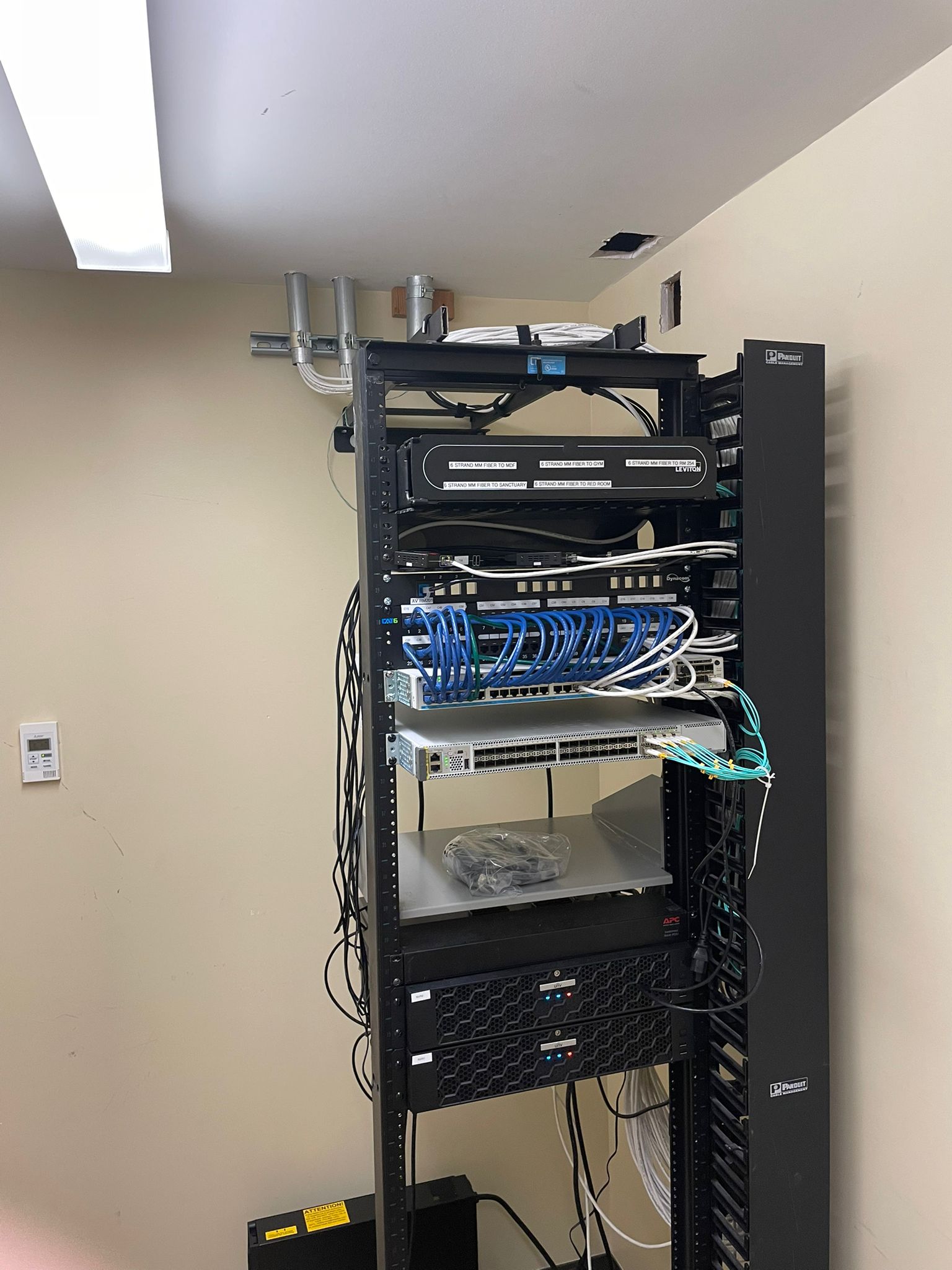
Structured cabling is the organized, standardized wiring infrastructure that carries data throughout a building: internet, phone systems, security cameras, access control, Wi-Fi access points, and anything else that needs to move digital information from one point to another. Instead of running cables ad hoc every time something new gets added, structured cabling follows a planned layout, usually built around a central patch panel or wiring closet, with labeled runs going out to each device or drop location.
Think of it as the difference between a neighborhood with planned streets and one where roads got added wherever someone decided to build a house. Both technically get you where you’re going, but one is a lot easier to navigate, expand, and fix when something breaks.
Why This Matters So Much for Security Cameras Specifically
Modern IP security cameras aren’t like the analog cameras of ten or fifteen years ago. A single 4K camera streaming continuously can use a meaningful chunk of bandwidth, and a property with a dozen or more cameras adds up fast. If the cabling behind those cameras wasn’t built with that kind of load in mind, a few things start to go wrong.
Footage drops or lags
This is the most common complaint we hear, and it’s almost always a cabling or network capacity issue rather than a camera problem. Old or improperly rated cable, cable runs that are too long without proper signal boosting, or a network switch that can’t handle the combined load of every camera streaming at once will all cause exactly this symptom.
Cameras randomly go offline
If a camera intermittently drops off the network, especially during high-traffic times of day, that’s often a sign the cabling infrastructure is being asked to do more than it was built for. Power delivery matters here too. Many IP cameras run on Power over Ethernet, meaning the same cable delivers both data and electricity, and cabling that wasn’t rated correctly for PoE can cause voltage drop issues over longer runs.
Recording gaps in exactly the moments that matter
This is the worst version of the problem. A network hiccup that causes a few seconds of choppy footage during a quiet afternoon is annoying. The same hiccup happening during an actual incident, a break-in, a dispute, an accident, means the footage you actually need might be exactly the part that’s missing or unusable.
Cat5e vs. Cat6 vs. Cat6a: Does It Actually Matter?
Yes, and this is one of the most common corners cut on budget installations. Here’s the practical difference:
- Cat5e is the older standard. It can technically handle basic network traffic and lower-resolution cameras, but it’s not the right choice for a modern multi-camera IP system, especially with PoE cameras drawing power over the same line.
- Cat6 is the current standard for most commercial installations. It supports higher bandwidth, handles PoE more reliably, and gives enough headroom for a typical camera system without becoming a bottleneck.
- Cat6a goes a step further, with better shielding and higher bandwidth capacity, and is worth considering for larger properties, longer cable runs, or businesses planning significant future expansion.
Choosing Cat5e because it’s cheaper per foot might save a small amount upfront, but on a system with a dozen or more cameras, it’s one of the most common reasons a system underperforms right out of the gate.
Wireless Isn’t a Real Substitute
A lot of business owners ask whether they can just skip wiring altogether and run cameras over Wi-Fi instead. It’s technically possible, and for a small number of cameras in a limited area, it can work fine. But Wi-Fi has real limitations that wired connections don’t: it’s shared bandwidth with everything else on the network, it’s more vulnerable to interference and dead zones, and it’s dependent on router placement and signal strength in a way that a dedicated cable run simply isn’t.
For any property with more than a few cameras, or any business relying on the footage for something that actually matters, wired connections through proper structured cabling are the more dependable choice. If your property’s current wifi setup is already stretched thin supporting staff devices, guest access, and point-of-sale systems, adding a full camera system on top of that same wireless network usually isn’t realistic.
What a Proper Structured Cabling Job Looks Like
A well-planned structured cabling project isn’t just running wire from point A to point B. It typically includes:
- A central patch panel or wiring closet where all cable runs terminate in an organized, labeled way
- Cable rated appropriately for the load, usually Cat6 or Cat6a for a modern camera and network system
- Proper cable pathways, meaning conduit or cable trays rather than cable run loosely through walls or ceilings, both for protection and for code compliance
- Network switches sized correctly for the number of devices and their combined bandwidth and power needs
- Documentation showing exactly what’s run where, which matters enormously the next time something needs troubleshooting or the system needs to expand
That last point gets overlooked constantly, and it’s a real problem. We’ve walked into buildings where nobody, including the current owner, has any idea what half the existing cable runs actually connect to. Undocumented cabling turns every future project into a guessing game.
Signs Your Property’s Cabling Needs an Upgrade
A few signals suggest it’s worth having your existing infrastructure evaluated before adding or expanding a camera system:
- Your building is older and cabling was installed years ago, possibly before modern camera or network demands existed
- You’re experiencing the footage drops, offline cameras, or lag described earlier
- You’re planning to add cameras, access control, or other network devices and aren’t sure your existing wiring can handle the added load
- Nobody currently has clear documentation of what’s already run through the building
- You’re renovating or expanding and have a rare opportunity to run new cabling before walls go back up
New Construction and Renovation: Get Cabling Planned Early
If you’re in the middle of new construction or a renovation, this is genuinely the best and cheapest time to get structured cabling done right. Running cable before drywall goes up costs a fraction of what it costs to retrofit a finished space later, and it means camera placement, access points, and network drops can all be planned together rather than worked around after the fact.
We work with a fair number of contractors and property owners specifically at this stage, coordinating cabling plans alongside CCTV and camera system design so the two get built together instead of cabling being an afterthought once the cameras are already picked out.
The Bottom Line
A security camera system is only as reliable as the infrastructure carrying its data, and that infrastructure is almost always invisible until something goes wrong. Spending money on high-resolution cameras while cutting corners on the cabling behind them is one of the most common and most avoidable mistakes we see, and it’s usually the reason a system that looked great on paper ends up frustrating everyone using it.
If you’re not sure whether your current wiring can support the system you want, or you’re planning a new install and want to get the cabling right from the start, a site assessment will tell you exactly what your property needs before you spend money on cameras that end up fighting an infrastructure that can’t keep up.
We handle structured cabling projects across Huntington Beach and Orange County regularly, for new camera systems, network upgrades, and renovations alike, and we’re happy to take a look at what you’re currently working with.